
YF10 Product Overview
Overview
YF10 (Your First 10k In Crypto) is a membership-based trading system. It includes access to:
- The The YF10 Members Hub on Mighty Networks: access provided on the Thank You page after purchase, and via a Welcome Email. All how-to videos and guides are inside the Hub.
- Access to the weekly YF10 Live Trading Room with Coach Mauricio.
Marketing Funnels - Internal Launches
Note: YF10 is also a $97 upsell in the 100x Polymarket funnel on Clickfunnels. See details here.
Internal Launch - Season 5
- Launched via webinar on 27 August 2026 (ET)
- Packages:
- 2,500 for Lifetime Access
- Payment methods: Card, Crypto: USDC on Arbitrum network, USDT on ERC20 network
- TREND Bonus until 11:59PM ET, 4 September 2026:
- New YF10 members: $3,750 of TREND
- Existing and Former YF10 members: extra +$250 of TREND = $4,000 of TREND
- YFM Bonus: extra 3 months of YFM
- 2,500 for Lifetime Access
- 1,500 for 6 months
- Payment methods: Card, Crypto: USDC on Arbitrum network, USDT on ERC20 network
- TREND Bonus until 11:59PM ET, 4 September 2026:
- New YF10 members: $1,875 of TREND
- Existing and Former YF10 members: extra +$250 of TREND = $2,125 of TREND
- YFM Bonus: extra 3 months of YFM
- TREND Bonus until 11:59PM ET, 4 September 2026:
- Payment methods: Card, Crypto: USDC on Arbitrum network, USDT on ERC20 network
- $497 for 8 weeks
- Payment methods: Card, Crypto: USDC on Arbitrum network, USDT on ERC20 network
- No TREND bonus for new, existing or returning members
- No extra time in YFM
- Official Start Date = Customer's purchase date
- Refund window: 30 days from purchase date
Internal Launch - Season 4 - CLOSED
- Launched via webinar on 28 May 2026 (ET)
- Packages:
- 1,500 for 6 months
- Payment methods: Card, Crypto: USDC on Arbitrum network, USDT on ERC20 network
- $497 for 8 weeks
- Payment methods: Card, Crypto: USDC on Arbitrum network, USDT on ERC20 network
- 1,500 for 6 months
- Official Start Date = Customer's purchase date
- Refund window: 30 days from purchase date
-
YF10 master Checkout page: https://go.scalpiustrading.com/join-yf10
Season 2 also includes an optional second component that can be purchased alongside YF10, via a separate checkout page. Clients will also have the option to purchase a Bitfunded Challenge.
We will be teaching clients how to pass their challenge by trading the YF10 system. If clients pass their challenge, they can be granted a funded trading account by Bitfunded.
- Bitfunded Prop Account registration: https://www.bitfunded.com/client/register?regid=4830208166
- Note: the prop account product is managed by Bitfunded. Real Trading Research cannot track purchases or issue refunds for the Bitfunded Challenge.
Internal Launch - Season 3 - CLOSED
- Launched via webinar on 26 March, 2026 (ET)
- Packages:
- 1,500 for 6 months
- Payment methods: Card, Crypto: USDC on Arbitrum network, USDT on ERC20 network
- $297 per month; renews automatically every month
-
Payment methods: Card only
Official Start Date = Customer's purchase date
Refund window: 30 days from purchase date
YF10 master Checkout page: https://go.scalpiustrading.com/join-yf10
Season 2 also includes an optional second component that can be purchased alongside YF10, via a separate checkout page. Clients will also have the option to purchase a Bitfunded Challenge.
We will be teaching clients how to pass their challenge by trading the YF10 system. If clients pass their challenge, they can be granted a funded trading account by Bitfunded.
-
- Bitfunded Prop Account registration: https://www.bitfunded.com/client/register?regid=4830208166
- Note: the prop account product is managed by Bitfunded. Real Trading Research cannot track purchases or issue refunds for the Bitfunded Challenge.
- 1,500 for 6 months
Internal Launch - Season 2 - CLOSED
- Launched via webinar on 22 January, 2026 (ET) and Encore event: 27 January, 2026 (ET)
- Packages:
- $2,500 for 12 months
- $1,500 for 6 months
- $497 for 8 weeks
- Official Start Date: Wednesday, 11 February 2026 (ET)
- Official End Dates
- 12 Months: 11:59PM Wednesday, 10 February 2027 (ET)
- 6 Months: 11:59PM Monday, 10 August 2026 (ET)
-
8 Weeks: 11:59PM Tuesday, 7 April 2026 (ET)
YF10 master Checkout page: https://go.scalpiustrading.com/packagedeal
Includes card, crypto (USDC on Arbitrum) and crypto (USDT on ERC20) for the 3 packages
Season 2 also includes an optional second component that can be purchased alongside YF10, via a separate checkout page. Clients will also have the option to purchase a Bitfunded Challenge.
We will be teaching clients how to pass their challenge by trading the YF10 system. If clients pass their challenge, they can be granted a funded trading account by Bitfunded.
- Bitfunded Prop Account registration: https://www.bitfunded.com/client/register?regid=4830208166
- Note: the prop account product is managed by Bitfunded. Real Trading Research cannot track purchases or issue refunds for the Bitfunded Challenge.
Internal Launch - Season 1- CLOSED
- Launched via webinar on Wednesday, 3 December, 2025
- Price: $497 for the first 8 weeks
- Official Start Date: Wednesday, 17 December 2025 (ET)
- Official End Date: 11:59PM Tuesday, 10 February 2026 (ET)
- Season 1 can no longer be purchased. All checkout pages will grant access to Season 2.
Clickfunnels (Upsell only)
See 100x Polymarket Club funnel
NOTE: If the manual checkout pages above cannot be used, Support agents can send the manual credit card form to collect the customer's card details in Ontraport. The purchase can then be processed manually. Access can be granted via the relevant field in the next step (see 'How To Grant Free Access').
How To Manually Grant Access
- In Ontraport, go to the customer's contact record
- Go to: Simple Products
- Scroll down to: YF10
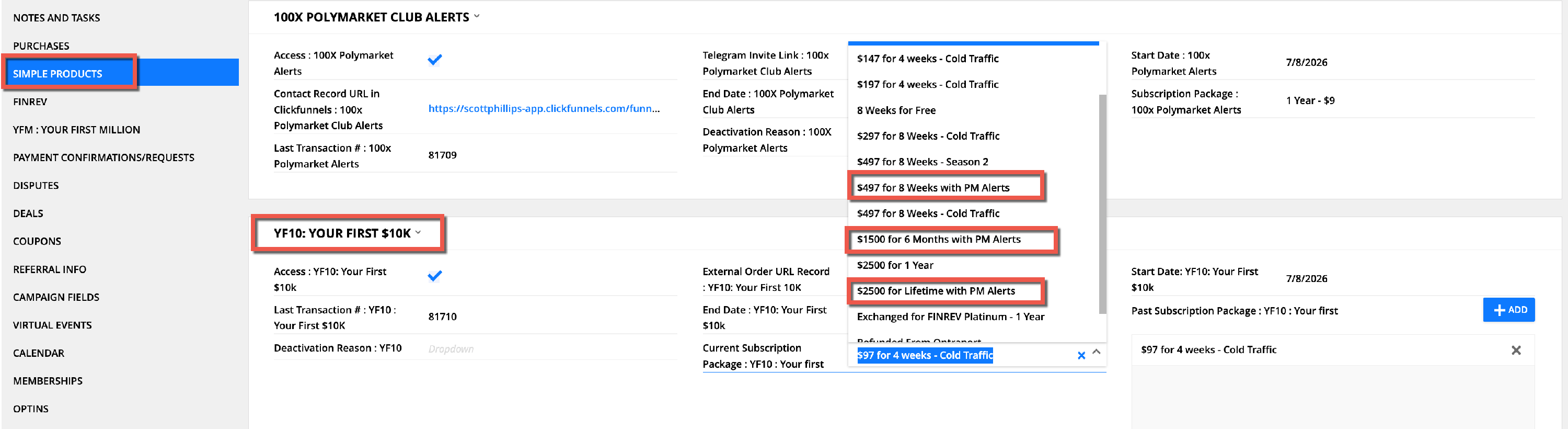
- Go to the 'Subscription Package : YF10 : Your first' field
- Select the relevant offer from the list:
- For Season 5
- $2500 for Lifetime with PM Alerts
- $1500 for 6 months with PM Alerts
- $497 for 8 weeks with PM Alerts
- For Season 4
- $1500 for 6 months
- $497 for 8 weeks with PM Alerts
- Monthly Subscription (still available but not promoted at launch event)
- For Season 3
- $1500 for 6 months
- $497 for 8 weeks
-
Monthly Subscription
- For Season 2 (paid customers):
- $2500 for 1 year
- $1500 for 6 months
-
$497 for 8 Weeks - Season 2
- Free access - approval required from Aaron, Ian or Caroline
- Free access: 8 Weeks For Free
- To grant Lifetime access, add 200 years to the End Date value
How To Track Purchases and Product Access
Purchases
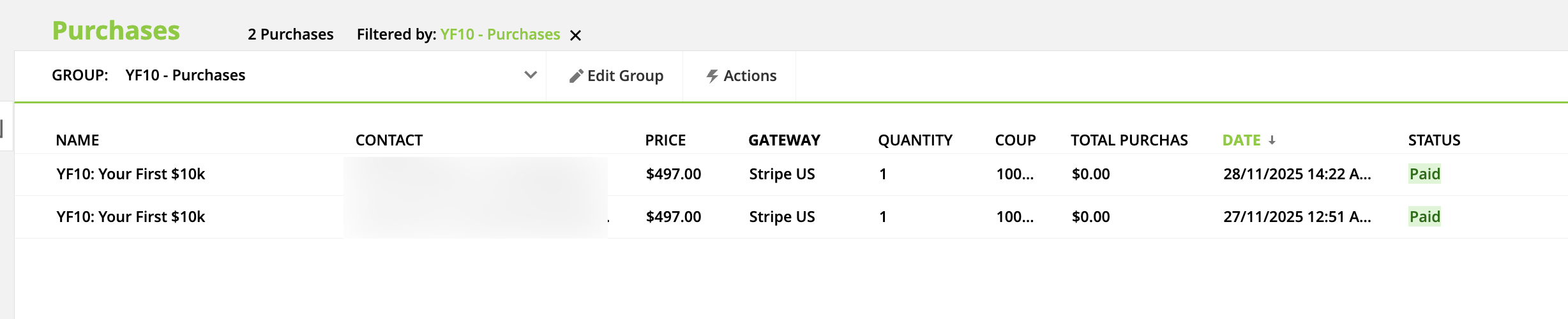
- In Ontraport, purchases will be shown on the 'Purchases' tab as follows:
- YF10: Your First $10k
- To view all YF10 sales in Ontraport, go to the 'Sales' object
- Search for the following Purchases group: 'YF10 - Purchases'
Product Access
Product access can be viewed in Ontraport on the 'Simple Products' tab. For a member to have access to YF10, the 'Access : YF10: Your First $10k' field must be checked.
If a member has purchased access to multiple seasons, all prior subscription packages will be displayed in the 'Past Subscription Package' field.
Their Start Date will remain as their original Season 1 purchase date, and their End Date will be based on the duration of their package - i.e. Purchase Date plus duration.

Product Support
Customer Support will be provided via email only. There is also a chat feed in the Mighty Networks space, where members can interact with other members.
Refunds
YF10 has a 30 day money-back-guarantee commencing from the purchase date. Prior to issuing a refund, we will try to save the sale IF the client is within 30 days of purchase.
Season 5 Refund Window:
- The official start date is the customer's purchase date (anytime after 28 May 2026)
- The last day to request a refund is 30 days after the customer's purchase date
If they are outside of the 30-day refund window, you can let them know that refunds are only possible within the first 30 days of purchase.
For any Season 5 refund requests, please run the Sales Saver sequence below for the $497 package only.
Note: The Sales Saver does NOT apply to the $97 YF10 upsell in the 100x Polymarket Club funnel.
If refund requests are received for the $1500 or $2500 package, please tag Ian in the HelpScout ticket.
Previous Refund Windows - no refunds available
- Season 4: after 28 May 2026
- Season 3: after 26 March 2026
- Season 2: official start date is: Wednesday, 11 February 2026 (ET). The last day to request a refund is 13 March 2026 (14 March 2026 in Aus/Asia), irrespective of purchase date.
Sales Saver Sequence: $497 package
Part 1: Research and Note Preparation
- Tag the HelpScout ticket with "yf10k-refund'
- Start a Note in HelpScout
- Go to Ontraport and search for the client by their email address*.
- Open their profile and go to 'Simple Products > YF10'.
- Check the 'Purchases' and 'Deals' tabs to find out if the client owns FinRev (full) or a FinRev Trial package. Ensure you search thoroughly as per the *NOTE below.
- Write a note in HelpScout and include the following:
- Purchase Date
- Refund Request date (as per HelpScout. State the timezone in brackets, ensuring you have the same timezone for Ontraport and HelpScout): e.g. 17 Jan 2026 (EST)
- YF10 Season and Price: e.g. YF10 Season 5 $497
- Time in program: (days)
- Other Products:
-
FinRev Trial: Yes/No. If Yes, include purchase date and specify if full FinRev or FinRev Trial.
If you've located a purchase for either product under a different email address, you can add the following comment to the HelpScout note:
"FinRev (full)/FinRev Trial purchase most likely under [email address]. Not yet confirmed with client."
-
- Tag Caroline and Ian in the note
- Send the note internally.
*NOTE: if you cannot locate a customer's purchase via their HelpScout email address, please search for their full name in Ontraport as they may have used a different email address to purchase.
- If you do locate a different email address, please ask the customer to confirm their purchase email address. For privacy reasons, we cannot tell the customer what the other email address is, in case it belongs to someone else with the same name.
- Once they confirm their email address, edit their HelpScout profile and add their purchase email address as follows: 'YF10 purchase email address: xxx@yyy.com'
- You can then proceed with the sales saver and/or refund
Part 2: Run the Sales Saver Sequence with the Client
The Sales Saver Sequence follows a conditional workflow based on the client's reason for requesting a refund. Once a reason is provided, proceed with a Sales Saver message from the list below.
The "→" icon indicates the title of the message that should be sent from the YF10 folder in TypeDesk.
- No reason given → Sales Saver 1: Enquiry
- If the customer does not wish to provide a reason or insists on a refund, proceed with the refund (see: 'How To Issue Refunds' below).
- If 2+ reasons are given:
→ Sales Saver 1FRT: Multiple Reasons (if they do not own FRT)
- Wait for a reply
- If they want the refund, follow the steps under 'How To Issue Refunds'
- If they request more information → Sales Saver 2: FRT Transfer Offer
- Wait for a reply
- If they accept the transfer offer, follow the steps under 'How to Transfer A Client to the FinRev Platinum Trial'
-
If they want the refund, follow the steps under 'How To Issue Refunds'
If 1 specific reason is given, choose from the options below:
- Reason: Time of YF10 signal is not convenient
→ Sales Saver 1FRT: Time of Signal (if they do not own FRT)
- Wait for a reply
- If they want the refund, follow the steps under 'How To Issue Refunds'
- If they request more information → Sales Saver 2: FRT Transfer Offer
- Wait for a reply
- If they accept the transfer offer, follow the steps under 'How to Transfer A Client to the FinRev Platinum Trial'
- If they want the refund, follow the steps under 'How To Issue Refunds'
- Reason: Don’t want to place/manage trades
→ Sales Saver 1FRT: Trading Execution/Funding (if they do not own FRT)
- Wait for a reply
- If they want the refund, follow the steps under 'How To Issue Refunds'
- If they request more information → Sales Saver 2: FRT Transfer Offer
- Wait for a reply
- If they accept the transfer offer, follow the steps under 'How to Transfer A Client to the FinRev Platinum Trial'
- If they want the refund, follow the steps under 'How To Issue Refunds'
- Reason: Not enough funds to trade or buy a challenge
→ Sales Saver 1FRT: Trading Execution/Funding (if they do not own FRT)
- Wait for a reply
- If they want the refund, follow the steps under 'How To Issue Refunds'
- If they request more information → Sales Saver 2: FRT Transfer Offer
- Wait for a reply
- If they accept the transfer offer, follow the steps under 'How to Transfer A Client to the FinRev Platinum Trial'
- If they want the refund, follow the steps under 'How To Issue Refunds'
- Reason: Tech or setup challenges
→ Sales Saver 1: Tech Help
- Wait for a reply
- If they accept the offer for a tech support call → Sales Saver 2: Tech Help
- If they want the refund, follow the steps under 'How To Issue Refunds'
If none of the options above apply → escalate to Caroline and Ian
How To Transfer A Client To the FinRev Platinum Trial
- Ensure written confirmation has been received after sending Sales Saver 2: FRT Transfer Offer
- TRANSFER STEPS
- Go to the customer's contact record in Ontraport
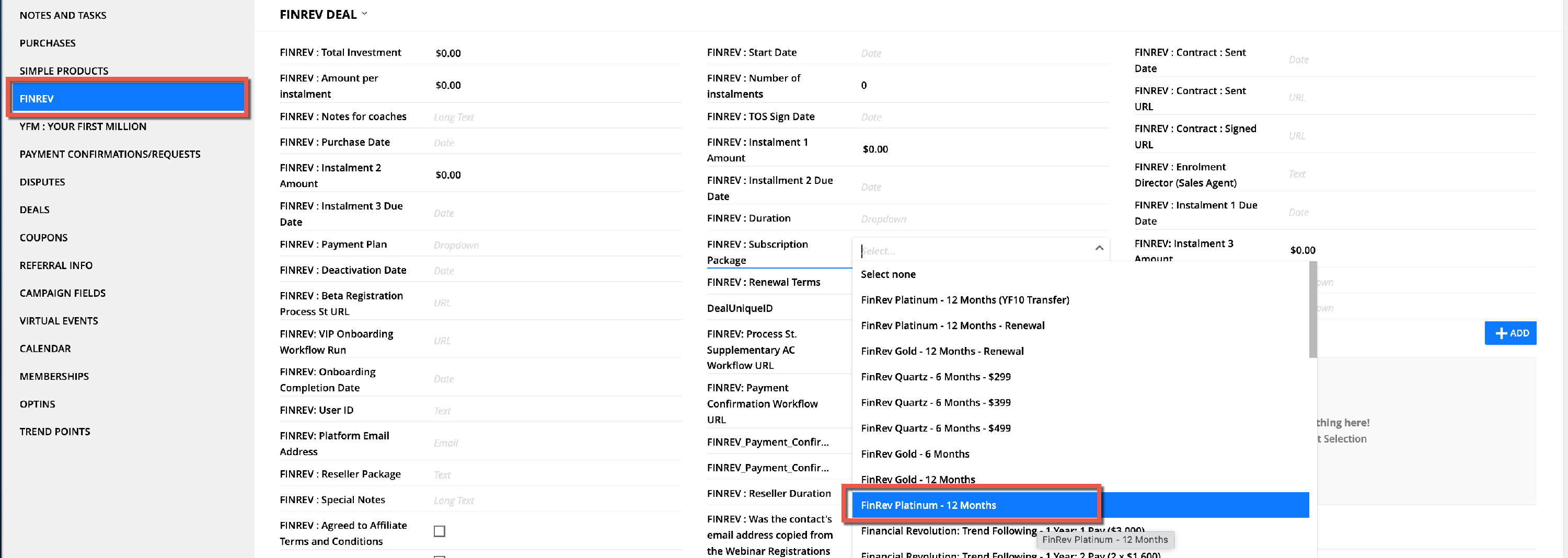
- Go to the 'FinRev' tab
- Select 'FinRev Platinum - 12 Months' from the 'FINREV : Subscription Package' drop-down
- Wait a few minutes
- Go the the 'Deals' tab
- Check that a 12-month Platinum deal has been generated for the client (Pandadoc will automatically send an email to the customer to request contract signature)
- Manually deactivate the client from YF10
- Uncheck the 'Access : YF10: Your First $10k' checkbox

- → Sales Saver 3: FRT Transfer Confirmation
How To Issue Refunds
To locate the customer's card purchase:
- Go to their Ontraport contact profile
- Go to: Simple Products > YF10 : Your First $10k
- Look for the 'Origin of Sale' field
- If blank, head to the 'Purchases' tab and refund the relevant YF10 transaction
- For Clickfunnels sales, click on the URL to navigate to the customer's purchase
- Follow the refund steps below for the relevant platform
- Clickfunnels
- Refund in Clickfunnels (search by email address)
- Go to the contact record in Ontraport
- Go to: Purchases
- Mark the purchase transaction as a refund
- A workflow run will be generated in Process St to complete the Zoom deactivation and to check the Mighty Networks deactivations
- Cryptocurrency Refunds:
- Locate cryptocurrency purchases by going to the Ontraport contact record:
- Locate a YF10 purchase record on the 'Purchases' tab
- Search the 'Payment Confirmations/Requests' tab for a corresponding crypto verification:
- Locate cryptocurrency purchases by going to the Ontraport contact record:

- Once confirmed, and after sending any Save messages, send the following message to the client in HelpScout:
- "Please send through your USDC wallet address on the Arbitrum network, and we will refund your crypto payment."
- Note: if the client has already provided their wallet address, proceed to the next step and tag Caroline.
- Once the wallet address has been received, tag Caroline Labour in a HelpScout note to process the refund. Please include:
- The client's contact profile URL
- Communicate the following timeline to the client: "Please allow up to five working days for your refund to be processed by our payments team."
- Caroline will complete the refund process including:
- Sending the cryptocurrency transfer
- Going to the 'Purchases' tab and refunding the transaction (it will not issue a $ refund, however it will deactivate YF10).