
FinRev Gold MAX
This is a short-term FinRev offer with a high-volatility setting, designed to take advantage of the bull run. We offer
- 6 months access to FinRev Gold MAX for $997 (Trend Following Only)
- Refund policy: 30 day money-back-guarantee
- No renewals will be offered at the end of the 6-month term
Marketing Funnels
- Live Event funnel
- Replay:
-
Sales page: https://go.scalpiustrading.com/finrevmax
- Sales are processed through Ontraport checkout pages
- Card: https://op.finrev.ai/finrev-gold-max
- Crypto:
- USDC on Arbitrum: https://op.finrev.ai/gold-max-USDC
- USDT on ERC20: https://op.finrev.ai/finrev-gold-max-USDT
FinRev Gold MAX Activations
- To view the purchase, go to Ontraport and search for the client's Contact Record (search by email address or full name)
- Go to 'Purchases' to view the purchase transaction:

- After a trial purchase takes place, a Deal will be created in Ontraport and the customer will be sent a 'FinRev Gold MAX' contract to sign
- After the contract is signed, the customer will receive a welcome email and and onboarding workflow
- The customer will be offered self-onboarding only. Support calls can be purchased if the customer requests one (see TypeDesk).
- All activation enquiries should be sent to Rhod
Sales Saver
Part 1: Research and Note Preparation
- Tag the HelpScout ticket with "FR-Gold-MAX-refund'
- Start a Note in HelpScout
- Go to Ontraport and search for the client by their email address*.
- Check the 'Purchases' and 'Deals' tabs to find out if the client owns any variation of FinRev: Platinum, Gold, Gold MaX or a FinRev Trial package. Ensure you search thoroughly as per the *NOTE below.
- Write a note in HelpScout and include the following:
- Purchase Date
- Refund Request date (as per HelpScout. State the timezone in brackets, ensuring you have the same timezone for Ontraport and HelpScout): e.g. 17 Jan 2026 (EST)
- Offer and Price: e.g. FinRev Gold MAX $997
- Time in program: (days)
- Other Products:
-
FinRev Trial: Yes/No. If Yes, include purchase date and specify if full FinRev: Platinum, Gold or FinRev Trial.
If you've located a purchase for either product under a different email address, you can add the following comment to the HelpScout note:
"FinRev (full)/FinRev Trial purchase most likely under [email address]. Not yet confirmed with client."
-
- Tag Caroline and Ian in the note
- Send the note internally.
Part 2: Send the Sales Saver to the Client
- Try to find out why the client is requesting a refund and offer a Tech Support call
- Use TypeDesk response:
Refunds
Card Refunds
For Card Refunds, select the transaction and click on 'Refund transaction'. Access will be deactivated automatically and off-boarding instructions will be sent.

Cryptocurrency Refunds
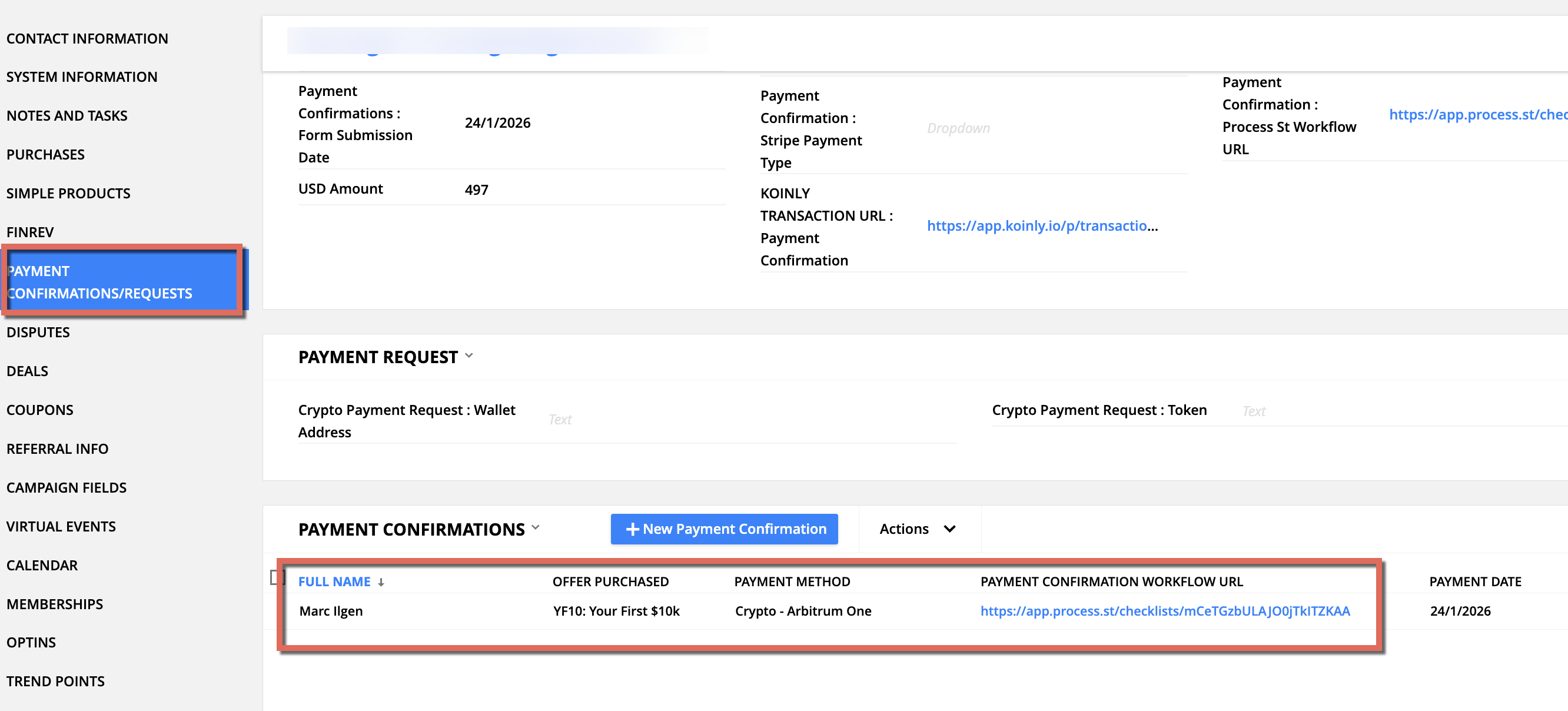
- Locate cryptocurrency purchases by going to the Ontraport contact record:
- Locate a FinRev Gold MAX purchase record on the 'Purchases' tab
- Search the 'Payment Confirmations/Requests' tab for a corresponding crypto verification (offer will be 'FinRev Gold MAX', not YF10)
-
Once confirmed, and after asking why they're leaving, send the following message to the client in HelpScout:
"Please complete the following form to submit your USDC wallet address on the Arbitrum network. Your refund will be processed within 5 business days. https://op.finrev.ai/USDC_Arbitrum"
- Once the form has been submitted, tag Caroline Labour in a HelpScout note to process the refund. Please include:
- The client's contact profile URL
- Offer purchase
- Start Date
- Caroline will complete the refund process including:
- Sending the cryptocurrency transfer
- Going to the 'Purchases' tab and refunding the transaction (it will not issue a $ refund, however it will deactivate the offer).